
IGR Odisha
Benchmark Valuation
Check the official government land rate for any village in Odisha before buying, selling, or registering property. Enter your district, village and Khata to get your IGR details instantly.
What is Benchmark Valuation?
The Inspector General of Registration (IGR), Government of Odisha, sets a minimum price for every type of land in every village across the state. This is called the benchmark valuation, also known as the guideline value or circle rate.
Why you must know it before any deal
- Stamp duty and registration fees are always calculated on the higher of the actual sale price or the benchmark value. You legally cannot register below the benchmark.
- If your agreed price is ₹15 lakh but the benchmark is ₹18 lakh, you pay stamp duty on ₹18 lakh, not on what you actually paid.
- Knowing the benchmark before signing the sale agreement saves you from budget surprises and strengthens your negotiation position.
Skip the portal
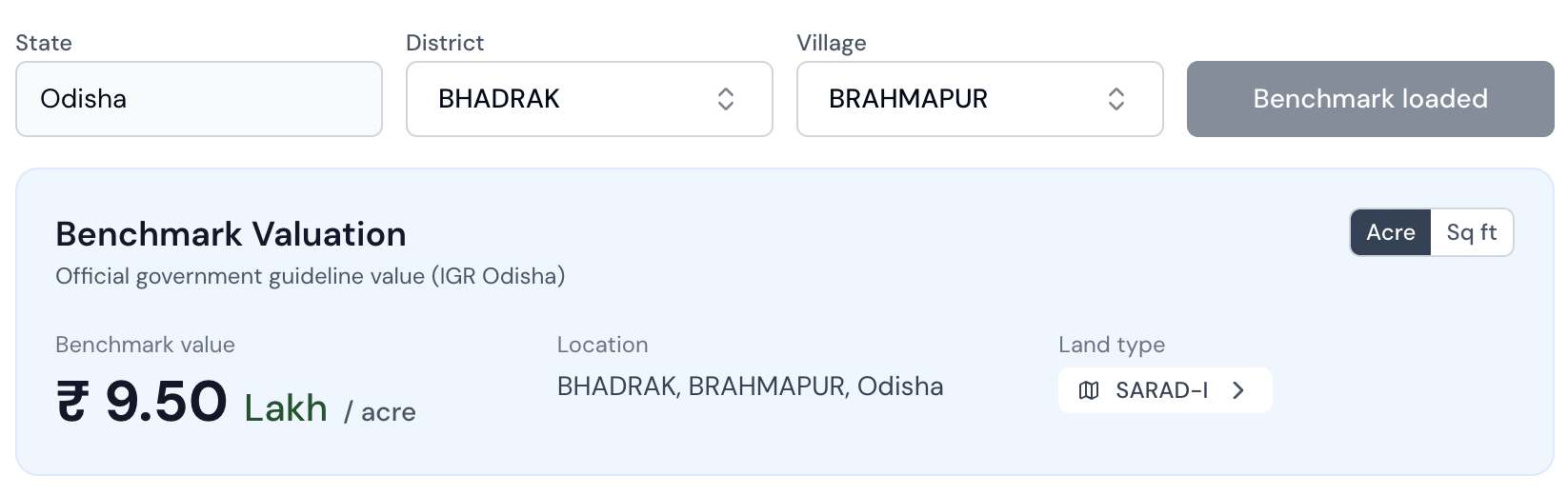
TLB shows benchmark value instantly
Instead of navigating through 7 dropdown fields on the IGR portal, TLB pulls the benchmark value for your plot automatically. Select your district and village. Done.
How to find benchmark value on the IGR Odisha portal
Navigate to igrodisha.gov.in/ViewFeeValue.aspx or go to Homepage, then Citizen Corner, then BenchMark Valuation. Fill the form top to bottom.
Select District
Choose the district where the property is located. All 30 Odisha districts are listed.
Select Registration Office (SRO)
After choosing the district, the Registration Office dropdown fills. This is the first common stumbling block. Not sure which SRO your village belongs to? Use the Find Your Registration Office tool on this page to look it up instantly.
Select Village and Thana
Choose the village and thana where your plot lies. Duplicate village names are very common. See Expert Tip 2 on how to use the Thana number to pick the correct one.
Select Kisam
Pick the land-use type matching your plot's RoR. Your Kisam is listed on your Patta — if you don't have it handy, look it up on Bhulekh first.
Find your Kisam on Bhulekh OdishaSelect Plot Number
Pick your plot number from the dropdown. Not sure of your exact plot number? Your RoR lists it clearly. If your plot doesn't appear (common with part plots like Plot 45/A), see Expert Tip 3 for the workaround.
Look up how to find your plot number from your RoREnter Area
Type the area of the plot you want to value. The area is also listed in your RoR under the plot details.
Look up how to find your plot area from your RoRSelect Unit and click SHOW
Choose your unit (Acre, Hectare, Sq Meter, Sq Feet, or Decimal) and click the green SHOW button. Results show the unit-wise benchmark value, area-wise benchmark value, and highest transaction value with date.
3 things the IGR portal never tells you
Most people get stuck at these three points. Here is exactly what to do.
How to find your correct Registration Office (SRO)
Once you pick a district, the Registration Office dropdown shows multiple SROs. You will often see entries like BBSR and BBSR – ADM. People guess the wrong one and then the Village-Thana dropdown doesn't show their village. The ADM suffix stands for Administrative. These offices handle government and institutional transactions only. For regular residential or agricultural land, always pick the SRO without the ADM suffix.
How to confirm your correct SRO:
- Check your RoR or Patta. It mentions the Tahasil, which maps to the SRO jurisdiction.
- Use 'Know Your SRO' on the IGR Odisha homepage. Enter your village or area to find the correct SRO.
- Check a previous registered deed for the property. The deed header clearly mentions the SRO.
Duplicate village names — use the Thana number as the tiebreaker
This is the most underrated problem on the IGR portal. Village names in Odisha are often spelled differently across records, and the same name can exist for multiple distinct thanas, each with a different benchmark value.
Example — District: Bhadrak, Registration Office: Bhadrak
If your RoR says Thana No. 150, match it to BARHAMPUR – 150. The number suffix is the Thana number.
Open your Patta or RoR document. At the top you will see: District, Tahasil, Village, Thana No., Khata No. The Thana number is listed right there. You can download your RoR for free at bhulekh.ori.nic.in.
Get your RoR instantly on TLB — freePlot not found or Kisam mismatch? Here is the workaround
This commonly happens with part plots when a larger plot has been subdivided into Plot 45/A, Plot 45/B, etc. The IGR system may only show the parent plot (Plot 45), not the sub-plots.
Part Plot Example
Benchmark values in Odisha are set at the village and Kisam level, not at the individual plot level. Two plots in the same village with the same Kisam will have the same benchmark value. Use any same-Kisam plot to get a reliable indicative figure. For a legally binding value at registration time, confirm with your Sub-Registrar Office.
Stamp duty and registration charges in Odisha
Once you have the benchmark value, you can calculate your government fees. Fees are always on the higher of sale price or benchmark value.
Standard charges — sale of immovable property
Charges by deed type
| Deed Type | Stamp Duty | Registration Fee |
|---|---|---|
| Sale (Immovable) | 5% | 2% |
| Sale with Agreement | 5% | 2% |
| Gift (Immovable) | 5% | 2% |
| Exchange of Property | 5% | 2% |
| POA with Possession | 5% | 2% |
| Partition (Equal Share) | Varies | 2% |
| Settlement | Varies | 2% |
| Mortgage with Possession | Varies | 2% |
Worked example
You are buying a Bari (residential) plot of 5 decimals in Bhubaneswar SRO, Khurda district. Agreed price: ₹15,00,000. Benchmark value from the portal: ₹18,00,000.
Calculation — Sale Immovable
Using the IGR Odisha Stamp Duty Calculator
The Registration and Stamp Duty Calculator at igrodisha.gov.in/StampDutyCalc.aspx works the same as the Benchmark Valuation page but also lets you select a deed type and directly computes your total payable fees. The same three expert tips above apply here too.
Open the Calculator
Go to igrodisha.gov.in/StampDutyCalc.aspx, or from the homepage go to Citizen Corner, then Regd. and Stamp Duty Calculator.
Fill District, SRO, Village, Kisam, Plot Number
Same process as the Benchmark Valuation page. Apply all three expert tips above where needed.
Select Deed Type
This extra field is what makes the calculator different. Choose from Sale Immovable, Sale with Agreement, Gift, Exchange, POA with Possession, Partition, or Settlement.
Enter Area and Unit, then click CALCULATE
The tool computes your exact Stamp Duty, Registration Fee, and total payable based on the benchmark value and deed type.
Key links for Odisha land records
Common questions about Benchmark Valuation
What is benchmark valuation in Odisha?
Benchmark valuation is the minimum price fixed by the Government of Odisha through IGR (Inspector General of Registration) for any land or property. It is the base rate below which no property can be registered. Stamp duty and registration fees are calculated on whichever is higher: the actual sale price or the benchmark value.
Check your plot's benchmark value on TLBIs benchmark valuation the same as circle rate or market value?
Benchmark valuation is the government's minimum guideline value, similar to circle rates in other states. It is not the same as market value. Market value depends on demand and location, and is often higher than the benchmark. You cannot register a property below the benchmark value.
Understand your land's value with TLBWhere can I check Odisha benchmark valuation online?
You can check the official benchmark valuation on igrodisha.gov.in. Select your district, registration office, village, kisam, and plot number. TLB also shows the benchmark valuation directly inside the dashboard alongside your RoR and Bhunaksha.
Check valuation instantly on TLBWhat is the stamp duty in Odisha in 2026?
Stamp duty in Odisha is 5% of the property value (or benchmark, whichever is higher). Registration fee is an additional 2%. User fee is ₹250 for the first 10 pages plus ₹15 per extra page. For women buyers, stamp duty is reduced to 4%.
Get a stamp duty estimate from our expertsCan I register property below benchmark value in Odisha?
No. The Sub-Registrar will reject the registration if the declared sale value is below the benchmark valuation. You must pay stamp duty on the benchmark value even if the actual transaction price is lower.
Talk to a TLB expert before registeringHow do I know which Registration Office (SRO) my plot belongs to?
Check your RoR or Patta document. It mentions the Tahasil, which maps to the SRO jurisdiction. You can also use the 'Know Your SRO' feature on the IGR Odisha homepage. If you see entries like 'BBSR' and 'BBSR-ADM', choose the one without ADM for regular residential or agricultural property.
Check your plot details on TLBThere are multiple villages with the same name in the IGR dropdown. Which one do I pick?
Use the Thana number as the tiebreaker. Your RoR or Patta document shows the Thana number at the top. Match it to the number suffix after the village name in the dropdown. For example, 'BARHAMPUR 150' means Thana 150. You can download your RoR for free at bhulekh.ori.nic.in.
Talk to a TLB land expertMy plot number does not appear in the IGR dropdown. What do I do?
This is common with part plots (for example, Plot 45/A) or recently surveyed land. Search for the base plot number (Plot 45). Since benchmark values in Odisha are set at the village and Kisam level, any plot in the same village with the same Kisam will show the same benchmark value. For a legally binding figure, confirm with your Sub-Registrar Office.
Check your plot on TLBWhat is the purpose of Bhulekh Odisha?
Bhulekh Odisha (bhulekh.ori.nic.in) is the official land records portal maintained by the Revenue and Disaster Management Department, Government of Odisha. It gives you digital access to the Record of Rights (RoR) — also called the Patta or Khatiyan — for every registered plot in the state. The RoR shows the current owner's name, plot number, area, Kisam (land-use type), co-owners, and any encumbrances or dues. For benchmark valuation specifically, Bhulekh is where you find your Kisam and exact plot number — both required fields when checking the IGR portal.
View Bhulekh Odisha on TLBHow to check Bhulekh by name?
Go to bhulekh.ori.nic.in and select your district, tahasil, and village. Under the search options, choose 'By Owner Name' and enter the landowner's name. The portal returns all Khata records linked to that name in the selected village. This is useful when you do not know your plot number or Khata number. TLB also lets you look up land records and find your plot number directly from the dashboard.
Search land records on TLBHow do I know my land records in Odisha?
Visit bhulekh.ori.nic.in to access your Record of Rights (RoR). You need your district, tahasil, village, and either your plot number or Khata number. The RoR shows owner name, area, Kisam, co-owners, dues, and encumbrances. For benchmark valuation, note your Kisam and plot number from the RoR — you need both when checking the IGR portal at igrodisha.gov.in. TLB brings your RoR, Bhunaksha, and benchmark value together in one place.
Check your land records on TLBHow can I check my Bhulekh case status in Odisha?
Mutation case status can be tracked on the Odisha Revenue Court Management System at rcms.odisha.gov.in. For mutation status specifically, go to bhulekh.ori.nic.in and navigate to Mutation Status, then enter your district, tahasil, and case number. A pending mutation means the latest ownership transfer has not yet been reflected in the RoR — which can complicate benchmark valuation checks and property registration. Always resolve pending mutations before finalising a sale.
Talk to a TLB expert about your caseHow to check market value of land in Odisha?
Go to igrodisha.gov.in/ViewFeeValue.aspx, select District, Registration Office, Village-Thana, Kisam, Plot No., Area, and Unit, then click Show. The page shows the Unit Wise Benchmark Value and also the Highest Transaction Value — the highest recorded sale price for that plot with date — which gives a real-world market reference. For actual current market value beyond the government floor, consult a local registered property valuer in the area.
Check benchmark value instantly on TLBHow often is the benchmark value revised in Odisha?
The Government of Odisha revises benchmark values periodically through government notifications, typically annually. The most recent revision was under the Odisha Stamp (Amendment) Rules 2025 (Notification No. 6452, December 2025), which significantly increased land values across the state. The IGR Odisha portal footer shows a Last Data Updated timestamp — always check this before relying on any value for a transaction.
Check the latest benchmark on TLBHow is IGR Odisha different from Bhulekh?
IGR Odisha (igrodisha.gov.in) handles property registration, stamp duty, benchmark valuation, and encumbrance certificates. Bhulekh Odisha (bhulekh.ori.nic.in) handles land records — RoR (Record of Rights), Patta, Khata, and mutation status. For any land transaction you need both: Bhulekh to verify ownership and land details, IGR to register the transaction and calculate fees. They are separate portals that complement each other.
See both records together on TLBHow to pay stamp duty online in Odisha?
Visit igrodisha.gov.in and click Online Payment of Stamp Duty. You can also use GRAS (Government Receipt Accounting System) — go to Inspector General of Registration and choose Pay without Registration for the citizen mode. The SHCIL e-Stamp Portal is another option for e-stamping. Save the payment receipt, as it is required at the SRO on your appointment date.
Talk to a TLB expert before payingHow to book a slot for land registration in Odisha?
Login to igrodisha.gov.in and click Online Slot Booking For Deed. Select your SRO, deed type, and an available date and time slot, then note your slot reference number. Online slot booking is now mandatory — walk-in registrations are not accepted at most SROs. Slots can fill quickly, so book early. Tatkal slots are available for urgent cases at an additional cost.
Talk to a TLB expert about registrationWhat documents are needed for property registration in Odisha?
For a Sale Deed registration you typically need: original Sale Deed (executed), Encumbrance Certificate, RoR or Patta of the property, Aadhaar and PAN of both buyer and seller, passport photographs, stamp duty payment receipt, and slot booking confirmation printout. The Requisite Documents for Registration section on the IGR Odisha homepage lists the exact requirements for each deed type.
Talk to a TLB expert before registeringHow to check Encumbrance Certificate (EC) online in Odisha?
Go to igrodisha.gov.in and click Online Encumbrance Certificate. After logging in, enter your property details: District, Registration Office, Village-Thana, Plot or Khata number, and the period (from year to year). Pay the EC fee online. Once processed, download the EC as a digitally signed PDF from your account. The eRegistration Odisha app (Android) also supports EC applications.
Talk to a TLB land expertHow to apply for land mutation online in Odisha?
Mutation (Dakhil Kharij) in Odisha is managed by the Revenue Department, not IGR. After your deed is registered at the SRO, IGR automatically transmits Form No. 3 to the Revenue Department to initiate mutation. Track mutation status at bhulekh.ori.nic.in. If the automatic process has not started, visit the Tahasil with your registered deed. After approval, download the updated RoR from bhulekh.ori.nic.in.
Talk to a TLB expert about mutationNot sure how benchmark valuation affects your transaction?
Our land experts in Odisha can review your plot, explain the current benchmark rate, and help you plan your transaction without surprises.
Also useful